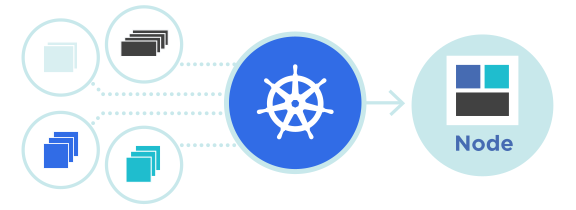
DaemonSet ใน Kubernetes รัน Pod บนทุก Node อัตโนมัติ
DaemonSet เป็นเครื่องมือสำคัญใน Kubernetes สำหรับการจัดการ Pod ที่ต้องรันบนทุก Node ในคลัสเตอร์ เช่น monitoring, logging, หรือ networking tools บทความนี้จะอธิบายวิธีใช้งาน DaemonSet อย่างละเอียด
DaemonSet คืออะไร?
DaemonSet ใน Kubernetes คือ workload object ที่รับประกันว่าจะมี Pod replica หนึ่งตัวรันบนทุก Node ในคลัสเตอร์ (หรือบน Nodes ที่ตรงกับ node selector) เมื่อมี Node ใหม่เพิ่มเข้าไป DaemonSet จะสร้าง Pod ใหม่โดยอัตโนมัติ
ใช้กรณี (Use Cases) ของ DaemonSet:
- Running cluster storage daemons (เช่น ceph, glusterd)
- Running logs collection daemons (เช่น filebeat, fluentd)
- Running node monitoring daemons (เช่น Prometheus Node Exporter)
- Running network daemons (เช่น Calico, Weave)
- Running system daemons
DaemonSet vs Deployment
| Feature | DaemonSet | Deployment |
|---|---|---|
| Pod placement | หนึ่ง Pod ต่อ Node | Pod สามารถรันบนหลาย Nodes |
| Replicas | ไม่มี (ขึ้นอยู่กับจำนวน Nodes) | ตั้งค่าได้ (replicas field) |
| Node Selector | รองรับ | รองรับ |
| Use case | System tools, monitoring, logging | Application services |
ตัวอย่าง DaemonSet YAML
นี่คือตัวอย่างพื้นฐาน DaemonSet สำหรับ monitoring:
apiVersion: apps/v1
kind: DaemonSet
metadata:
  name: node-exporter
  namespace: monitoring
spec:
  selector:
    matchLabels:
      app: node-exporter
  template:
    metadata:
      labels:
        app: node-exporter
    spec:
      containers:
      - name: node-exporter
        image: prom/node-exporter:latest
        ports:
        - containerPort: 9100
        volumeMounts:
        - name: proc
          mountPath: /host/proc
          readOnly: true
        - name: sys
          mountPath: /host/sys
          readOnly: true
      volumes:
      - name: proc
        hostPath:
          path: /proc
      - name: sys
        hostPath:
          path: /sys
      hostNetwork: true
      hostPID: true
คำอธิบายของ DaemonSet Configuration
- selector: ใช้สำหรับเลือก Pods ที่ DaemonSet จะจัดการ
- template: Pod template ที่จะใช้สร้าง Pod
- containers: ข้อมูล container image และ ports
- volumeMounts: การ mount volumes เข้า container
- volumes: นิยาม volume ที่ต้องใช้ (hostPath, emptyDir, configMap, etc.)
- hostNetwork: ใช้ host network namespace
- hostPID: ใช้ host PID namespace
Node Selector ใน DaemonSet
คุณสามารถจำกัด DaemonSet ให้รันเฉพาะบน Nodes ที่มี label ที่ต้องการ:
apiVersion: apps/v1
kind: DaemonSet
metadata:
  name: gpu-monitoring
spec:
  selector:
    matchLabels:
      app: gpu-monitor
  template:
    metadata:
      labels:
        app: gpu-monitor
    spec:
      nodeSelector:
        accelerator: nvidia-gpu  # รันเฉพาะบน GPU nodes
      containers:
      - name: gpu-exporter
        image: nvidia/gpu-monitoring:latest
ทำการสร้าง DaemonSet
kubectl apply -f daemonset.yaml
kubectl get daemonset
kubectl describe daemonset node-exporter -n monitoring
ตรวจสอบ DaemonSet Pods
ดูว่า Pods ได้รันบนทุก Nodes หรือไม่:
kubectl get pods -n monitoring -l app=node-exporter -o wideผลลัพธ์ควรแสดง Pod หนึ่งตัวต่อ Node
Update Strategy สำหรับ DaemonSet
DaemonSet รองรับ update strategy สำหรับการ rollout:
spec:
  updateStrategy:
    type: RollingUpdate
    rollingUpdate:
      maxUnavailable: 1  # จำนวน Pods ที่สามารถ unavailable ได้ในระหว่าง update
Delete DaemonSet
การลบ DaemonSet:
kubectl delete daemonset node-exporter -n monitoring
kubectl delete daemonset node-exporter -n monitoring --cascade=orphan  # ลบ DaemonSet แต่เก็บ Pods
Best Practices สำหรับ DaemonSet
- Resource Limits: ตั้งค่า CPU และ Memory limits เพื่อไม่ให้กระทบต่อ Nodes
- Tolerations: ใช้ tolerations เพื่อให้ DaemonSet รันบน Nodes ที่มี taints
- Node Selector: ใช้เพื่อจำกัด DaemonSet ให้รันเฉพาะบน Nodes ที่ต้องการ
- Health Checks: ตั้งค่า liveness และ readiness probes
- Security: ใช้ security policies และ RBAC
ตัวอย่าง: DaemonSet พร้อม Tolerations
apiVersion: apps/v1
kind: DaemonSet
metadata:
  name: system-monitoring
spec:
  selector:
    matchLabels:
      app: system-monitor
  template:
    metadata:
      labels:
        app: system-monitor
    spec:
      tolerations:
      - key: node-role.kubernetes.io/master
        operator: Exists
        effect: NoSchedule
      containers:
      - name: monitor
        image: monitoring-tool:v1
        resources:
          limits:
            cpu: 100m
            memory: 128Mi
          requests:
            cpu: 50m
            memory: 64Mi
สรุป
DaemonSet เป็นเครื่องมือที่สำคัญสำหรับการรัน system daemons และ monitoring tools บนทุก Nodes ในคลัสเตอร์ ด้วยการเข้าใจ DaemonSet อย่างถูกต้อง คุณสามารถจัดการระบบทั่วทั้งคลัสเตอร์ได้อย่างมีประสิทธิภาพ

